Installation
Here you can find instructions for the installation of PUZZLE Platform. This page references the repository under https://gitlab.com/puzzle-project/platform-setup
Configuration
Minimum Requirements
Puzzle components can be installed in a single VM with the following requirements.
CPU(cores) |
#Memory(GB) |
Storage(GB) |
|---|---|---|
4 |
16 |
40 |
Prerequisites
Docker Engine: Version: 20.10.17+
Docker-Compose: Version: 1.29.2+
Kafka configuration
Go to kafka-cluster folder under the repository and edit .env file.
Change <YOUR_SERVER_IP> with the value of the server IP
Change <YOUR_SERVER_PUBLIC_IP> (if it is NOT different from the server IP add server IP from the previous step).
Puzzle core configuration
Go to puzzle folder under the repository and edit .env file.
Change <YOUR_SERVER> with the value of the server IP.
Change <YOUR_DOMAIN> if you have a domain to expose the Dashboard component, else put the server IP.
Change <KAFKA_HOST> with kafka IP from kafka configuration step
Change all <YOUR_USERNAME> fields with the desired username
Change all <YOUR_PASSWORD> fields with the desired password
Change all <YOUR_KEY> fields with the desired key
Dashboard
Go to dashboard folder under the repository and edit .env file.
Change <YOUR_SERVER_IP> with the value of the server IP.
Docker login
Some docker images are hosted in a private repo. So, before setup you need to login to the private repository. For the login credentials contact Alexandros Vasileiou at avasileiou@ubitech.eu or PUZZLE consortium at office@puzzle-h2020.com.
docker login registry.ubitech.eu -u <username> -p <password>
Setup
Go to scripts folder under the repository and give executable rights to all the scripts, by executing the script:
sudo ./init.sh
Start Puzzle
./create-whole-stack.sh
Stop Puzzle
./drop-whole-stack.sh
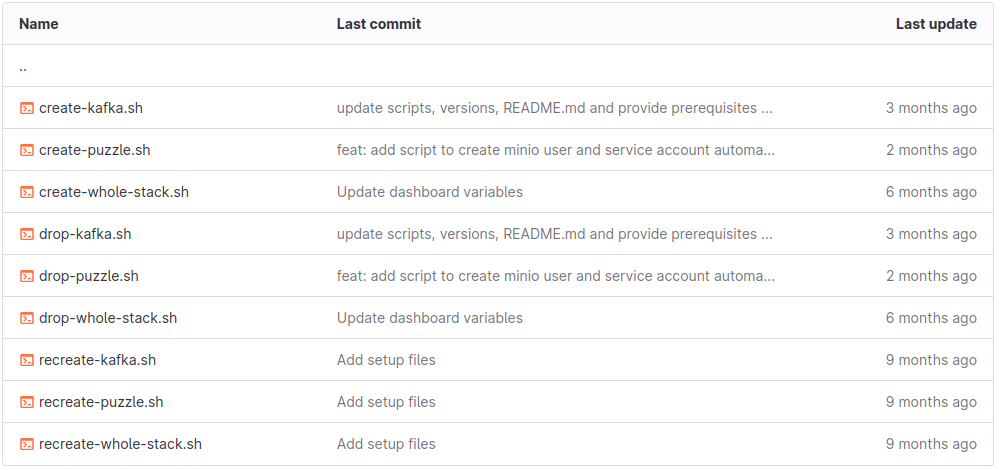
*Additionally, for debugging reasons, there are scripts for each individual component as per the below image.*
Kubernetes Cluster
Puzzle needs the user’s applications to be deployed in a kubernetes cluster. The requirements of the kubernetes cluster are the following:
Kubernetes version: 1.21
CNI: Cilium
Master Hardware:
        CPU: 4cores
        MEMORY: 8GB
OS: Linux with kernel >= 5.0.0
Puzzle Config for Kubernetes
In order for Puzzle components to communicate with the kubernetes cluster, the Security Orchestator (SO) component exposes a REST API.
Add kubernetes credentials
You need to provide the contents of the *.kube/config* file of kubernetes.
METHOD: POST
#Change <serverIP>
URL: http://<serverIP>:8300/api/v1/kubernetes/config
#Update with the corresponding values
JSON File:
{
        "masterUrl": "<masterUrl>",
        "clientCertData": "<clientCertData>",
        "clientKeyData": "<clientKeyData>",
        "caCertData": "<caCertData>"
}
Check communication with kubernetes
It responds with SUCCESS if the configuration was successful else it responds with FAIL.
METHOD: GET
#Change <serverIP>
URL: http://<serverIP>:8300/api/v1/kubernetes/checkConfig
Fetch kubernetes credentials
It returns the kubernetes credentials with an id. You need that id in case that you want to delete the credentials.
METHOD: GET
#Change <serverIP>
URL: http://<serverIP>:8300/api/v1/kubernetes/fetchAll
Delete kubernetes credentials
You need the id of the stored credentials.
METHOD: DELETE
#Change <serverIP> and <id>
URL: http://<serverIP>:8300/api/v1/kubernetes/delete/id/<id>
Node Level Agent
You need to add Node Level Agent (NLA) to all the worker nodes of the kubernetes cluster. For the time being the installation of NLA is a manual procedure.
Download NLA
wget --header "DEPLOY-TOKEN: PppkJjU-SEUH4skR9Pks" https://gitlab.com/api/v4/projects/33843622/packages/generic/puzzle-nla/1.0.0/puzzle-nla
Run nla
NLA is a binary executable that accepts REST calls at port 65103. After you give executable rights, you can run NLA as a background process.
sudo nohup ./puzzle-nla &
*For the time being NLA supports Ubuntu, Debian and Centos distributions*